Bible Loop: Bible Versions
The Bible tab lets you read or listen to the Bible. From here, you can look up any book, chapter, or verse of the Bible. What Bible Versions are Available? If you can't find a specific Bible version…

Updated
by Leah Nelson
The Bible tab lets you read or listen to the Bible. From here, you can look up any book, chapter, or verse of the Bible.
What Bible Versions are Available?
If you can't find a specific Bible version or format (such as an audio Bible, offline version, New Testament, or Old Testament), it may not be currently available from our publishing partner.
Because we don't own Bible version content, availability depends on the permissions granted to us by each Bible publisher.
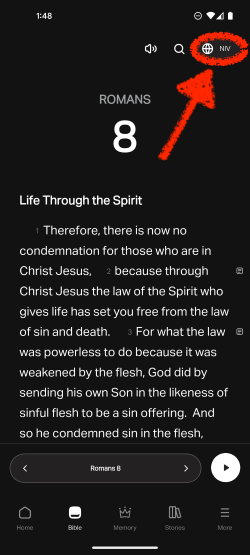
Changing a Bible Version
- Select the Bible tab on the bottom menu.
- Tap the version selector in the top right corner.
- Select which version you want to read the Bible in!
If you would like to request a Bible version, please fill out this request form.
How did we do?
Bible Loop: Bible Audio
