Bible Loop: How to Turn On/Off Your Streak
Turn Streak off to take a break or stop tracking your daily activity progress.

Updated
by Zizoh Anto
Turn the Streak feature on or off to take a break or stop tracking your daily activity progress on Bible Loop.
Turning off your Streak will reset your Streak count to zero when you turn it back on.
How to Turn Off Your Streak
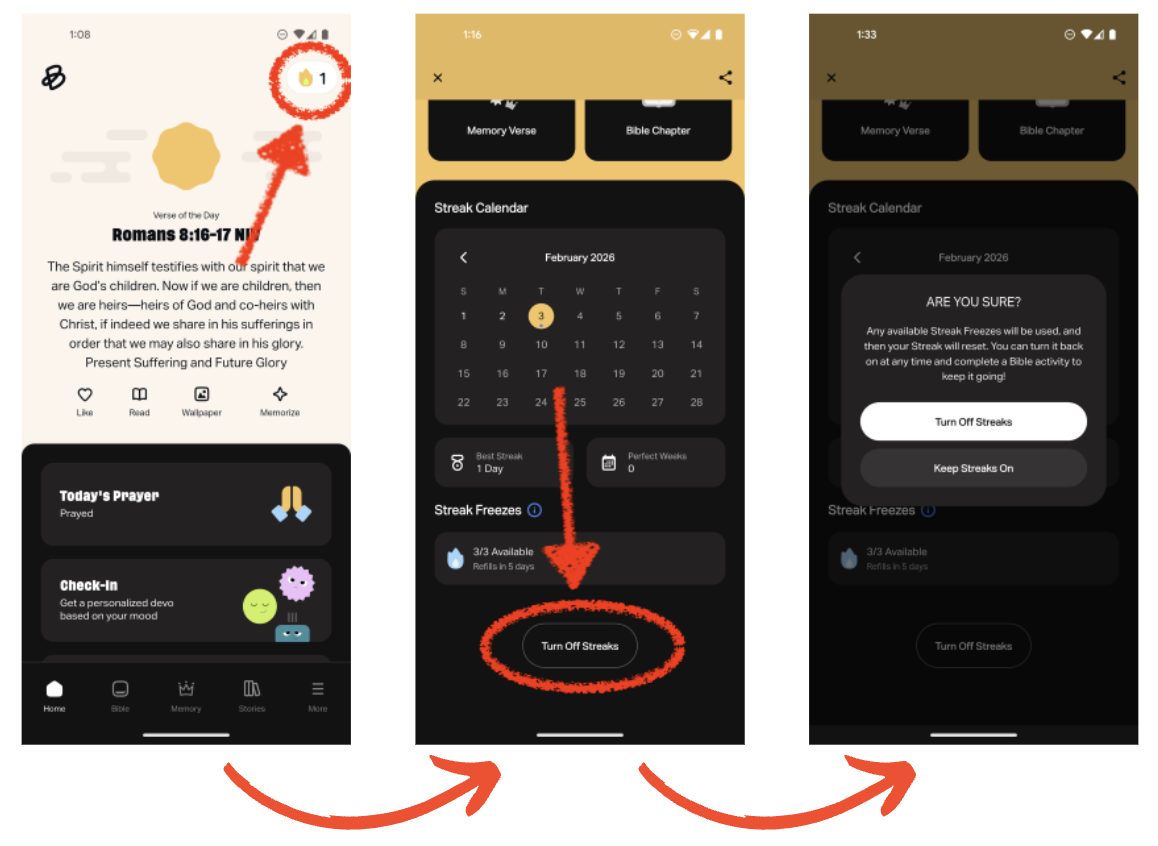
- On the Home tab, select the Streak icon in the top right corner.
- Scroll to the bottom of the screen and select Turn Off Streaks.
- Select Turn Off Streaks to confirm.
How to Turn On Your Streak
After it's been turned off, the Streak feature can be turned back on. Once re-enabled, completing any eligible activity will restart your Streak to zero.
- On the Home tab, select the Streak icon in the top right corner.
- Select Turn On Streaks at the top of the screen.
How did we do?
Bible Loop: Streak
Bible Loop: Streak Freezes
