Table of Contents
Bible Loop: Streak Freezes
Keep your Streak going even if you miss a day.

Table of Contents
Streak Freezes help you keep your Streak going even if you miss a day. Streak Freezes are automatic helpers that protect your Streak if you miss a day. If you’ve already started a Streak and skip a day, a Streak Freeze will be used to “freeze” that day so your Streak doesn’t break.
How to Track Your Available Streak Freezes
You get 3 Streak Freezes every week. They reset on Sundays and are used automatically when needed. To check how many you have left:
- Select the Home tab.
- Select the Streak icon in the top right corner.
- Scroll to the Streak Freezes section.
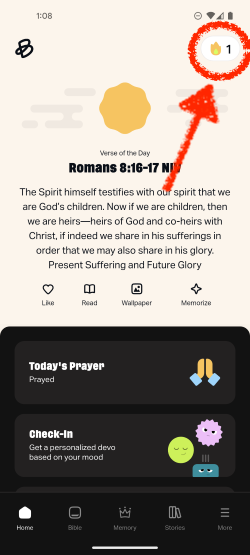
Understanding Streak Statuses
You’ll notice color indicators both on the Streak icon (in the top right corner of the Home tab) and on your Streak calendar. These colors help you quickly understand your current progress for the day:
🟡 Fulfilled (Yellow): You’ve completed at least one eligible activity today. Great job!
⚪ Unfulfilled (Gray): You haven’t completed an activity today. There’s still time!
🔵 Frozen (Light Blue): You missed a day, but a Streak Freeze was automatically used to save your progress.
How did we do?
Bible Loop: How to Turn On/Off Your Streak
Bible Loop: Check-In
