iOS: Privacy Policy Changes
Why Am I Being Asked to Accept the Privacy Policy? . We’ve updated our Privacy Policy and are asking some users to review and accept the updated version before continuing to use their accounts. This…

Why Am I Being Asked to Accept the Privacy Policy?
We’ve updated our Privacy Policy and are asking some users to review and accept the updated version before continuing to use their accounts. This helps ensure we comply with privacy laws in certain regions and continue protecting your data responsibly.
Why Am I Seeing This Now?
Privacy regulations require us to receive affirmative consent before you can continue using your account.
You may see this message if:
- You’re creating a new account
- You’re signing in after a recent update to our Privacy Policy
- You’re returning after a period of inactivity during a policy update
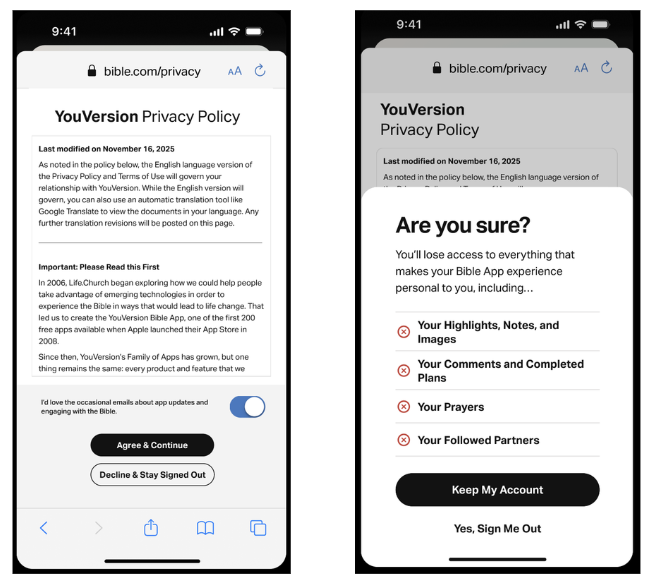
What Happens If I Accept?
We’ve updated our Privacy Policy to comply with privacy laws in certain regions. To continue using your account, we’re required to receive affirmative consent to the updated policy.
If you accept the updated Privacy Policy:
- You’ll continue to have full access to your account
- No additional action is required
- You won’t see the message again unless there is another privacy policy update
What Happens If I Decline?
If you choose to decline:
- Your account access will be disabled
- You’ll be signed out of the app
- Your account will not be immediately deleted
Your account data will be retained for up to 4 years. If you do not accept that time, your data may be permanently deleted.
You may also receive reminders before deletion, so you can restore your account by accepting the policy.
What Changed in the Privacy Policy?
Our most recent update reflects changes made to ensure compliance with evolving privacy regulations. You can review the full Privacy Policy here.
Is This Related to GDPR or Other Privacy Laws?
Yes. This update helps ensure compliance with regulations such as GDPR and other applicable privacy laws.
I Accepted, But I Still Can’t Access My Account
If you’ve accepted the policy and are still experiencing issues accessing your account, please contact our Support team so we can assist you.
I Have Additional Privacy Questions
If you have specific questions about your data or privacy rights, please contact our Support team by completing this form.
Our Commitment to You
We are committed to protecting your personal information, being transparent about how your data is used, and complying with applicable privacy laws.
Thank you for taking the time to review our updated Privacy Policy!
How did we do?
iOS: Feature Limits
